Tech,Space,Gaming, and Science Fiction News to wet your whistle
Powershell GUI format text on TextBox and RichTextBox
Get link
Facebook
X
Pinterest
Email
Other Apps
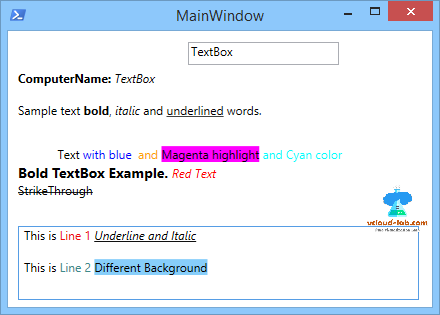
I was preparing some auditing and reporting tools for some of newly received projects and wanted a way to formatting representation of data on my GUI form in nice way. To show this nice formatting you can use tags inside TextBlock and RichTextBox inside xaml code and binding can be used.These tags are as same as html tags. below examples are used on TextBlocks. For more on tagging you can check this link https://ift.tt/2m31Sta, below are the few examples I used for formatting.
Sample text bold, italic and underlined words. Text with blue andMagenta highlight
Formatting text data on Richtextbox is very easy and formatting is done in same manner using tags on paragraphs in below format.
Download this script here, it is also available on github.com.
.NOTES -------------------------------------------------------------------------------- Code generated using by: Visual Studio Created on: 26 June 2018 4:57 AM Get Help on: http://vcloud-lab.com Written by: Kunal Udapi Build & Tested on: Windows 10 Purpose: This script is an example of styling Font on textbox. -------------------------------------------------------------------------------- .DESCRIPTION GUI script generated using Visual Studio 2017 #>#Load required libraries Add-Type -AssemblyName PresentationFramework, PresentationCore, WindowsBase, System.Windows.Forms, System.Drawing [xml]$xaml = @" xmlns="http://schemas.microsoft.com/winfx/2006/xaml/presentation" xmlns:x="http://schemas.microsoft.com/winfx/2006/xaml" xmlns:d="http://schemas.microsoft.com/expression/blend/2008" xmlns:mc="http://schemas.openxmlformats.org/markup-compatibility/2006" xmlns:local="clr-namespace:WpfApp9" Title="MainWindow" Height="315" Width="440"> Sample text bold, italic and underlined words. Text with blue andMagenta highlightand Cyan color"Underline" FontStyle="Italic" FontFamily="Segoe UI" Text="Underline and Italic"/> "Segoe UI" Text="This is "/> "#FF3E8B8B" FontFamily="Segoe UI" Text="Line 2 "/> "LightSkyBlue" FontFamily="Segoe UI" Text="Different Background"/> "@ #Read the form $Reader = (New-Object System.Xml.XmlNodeReader $xaml) $Form = [Windows.Markup.XamlReader]::Load($reader) #AutoFind all controls $xaml.SelectNodes("//*[@*[contains(translate(name(.),'n','N'),'Name')]]") | ForEach-Object { New-Variable -Name $_.Name -Value $Form.FindName($_.Name) -Force } #Mandetory last line of every script to load form [void]$Form.ShowDialog()
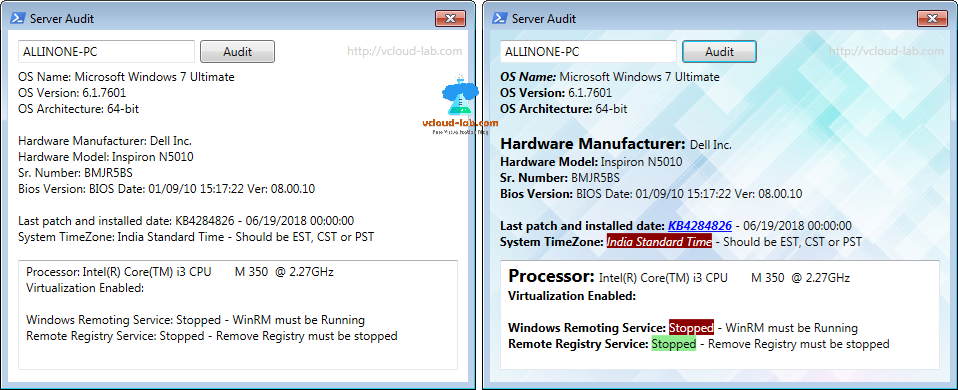
The earlier shown tags example was to update XAML code directly, but I was also looking to update text after data collection, and my report should be looking nicer, cleaner and professional while sharing. As below I have 2 screenshots of same report but check the difference right side of screen definitely looks cool and much good in readable format, for example I need to highlight if there is a unwanted settings it should be shown as Red.
Here in this script I have created two functions, first is for TextBox and second is for RichTextBox. The gist is as below.
First function TextFormatting has below code and it is to format text on Textblock. More information on this object can be found here https://ift.tt/29rWpV2.
Next function Format-RichTextBox formats text on richtextbox, more Information can be found on this .net object as below urls. https://ift.tt/2hTPV75 https://ift.tt/20y7Vko
By Liam McCabe This post was done in partnership with Wirecutter . When readers choose to buy Wirecutter's independently chosen editorial picks, it may earn affiliate commissions that support its work. Read the full article here . After six summers of researching, testing, and recommending window air conditioners, we've learned that quiet and affordable ACs make most people the happiest—and we think the LG LW8016ER will fit the bill in most rooms. This 8,000 Btu unit cools as efficiently and effectively as any model with an equal Btu rating, and runs at a lower volume and deeper pitch than others at this price. Little extra features like a fresh-air vent, two-axis fan blades, and a removable drain plug help set it apart, too. The LG LW8016ER is a top choice for an office or den, and some people will find it quiet enough for a bedroom, too. If our main pic...
Currently priced at: 14.69 via https://ift.tt/HzrCcJa May 4, 2022 at 07:00PM Manage Unsubscribe from these notifications or sign in to manage your Email service. ...
Pre-loaded cartridges of cannabis concentrate are currently among the most popular means of consumption, and for good reason. They're discreet to use and easy to handle, a far cry from the dark days of 2016 when we had to dribble hash oil or load wax into narrow-mouthed vape pens by hand. But, frustratingly, an ever increasing number of oil cartridge manufacturers employ one-off design standards so that their products won't work with those of their competitors, thereby locking customers into proprietary ecosystems. We've already seen this with nicotine vaporizers -- which has a seen a massive rise in "pod systems" in the last few years, each outfitted with a unique canister and battery built to be incompatible with those of their competition. Is it too late for the burgeoning cannabis industry to set a universal standard for their product designs? ...





Comments
Post a Comment